Rethinking Health Apps & Tracking with Embedded intelligence — P2
“Build. Test. Learn. repeat”
This has been previously published in linkedin, on 24th May 2026 - Link
In Part 1, I wrote about the issues of cognitive overload and feature bloat in incredibly useful app ecosystems like Apple Health, and the resulting human problems faced by everyday users like me. The outcome was an experiment to see what these apps could become with embedded AI - resulting in a prototypical iOS app I now live with daily, called HealthMate. This layers a conversational AI interface and generative UI capabilities onto the familiar structure of a health app. I also wrote about letting go of rule-based design, and why thinking about contextual empathy matters.
Part 2 goes further. It's about building meaningful interactions into the app that drive better outcomes and move closer to a health companion that is genuinely proactive rather than merely reactive. Again, the focus is not on visual polish yet, but building and learning with a behavioural prototype.
Driving Better Health Tracking Through Behaviour — Learning from the COM-B Model
The Problem Beneath the Problem
Now that I'm using the app every day, I'm focused on something deceptively simple: logging consistently. And it turns out that having a capable, well-designed app is not enough - I keep forgetting to log critical data.
It's not just me — adherence and frequency of use are well-documented problems in health tracking, and significant predictors of whether an app produces any meaningful health benefit at all. (eg. Link)
Apps like Apple Health address this partly through notifications and reminders, and my earlier conversational UI work built on that foundation. But it still felt insufficient. That gap pushed me to explore a behavioural model I had previously only used in service design contexts: COM-B.
Applying the COM-B behavioral model
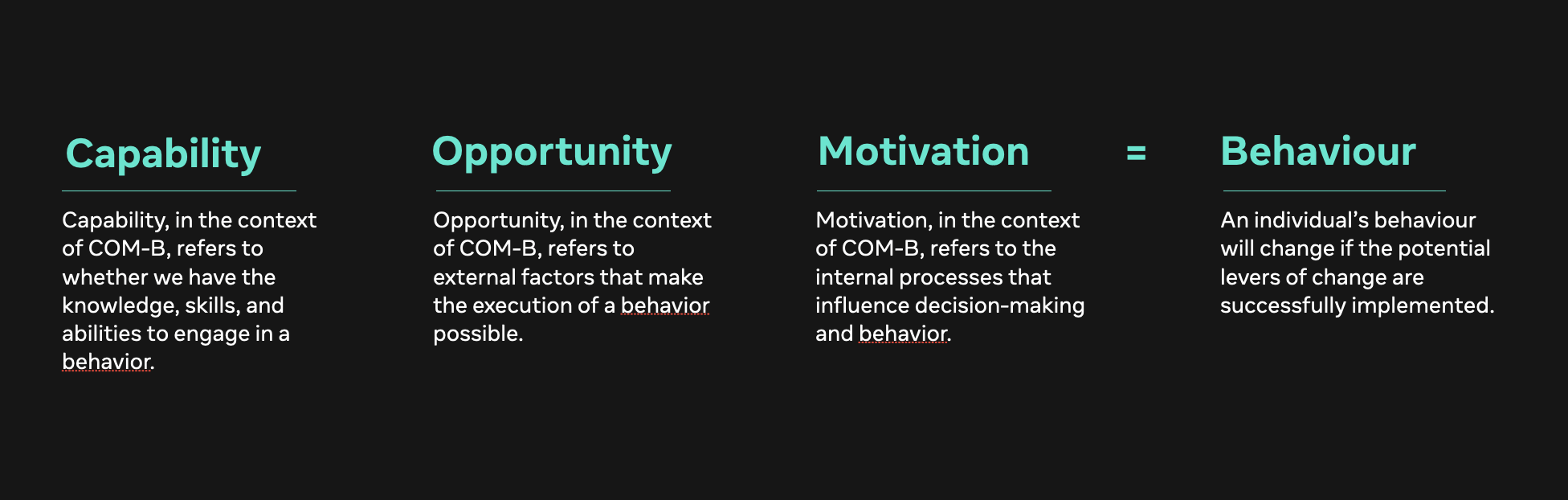
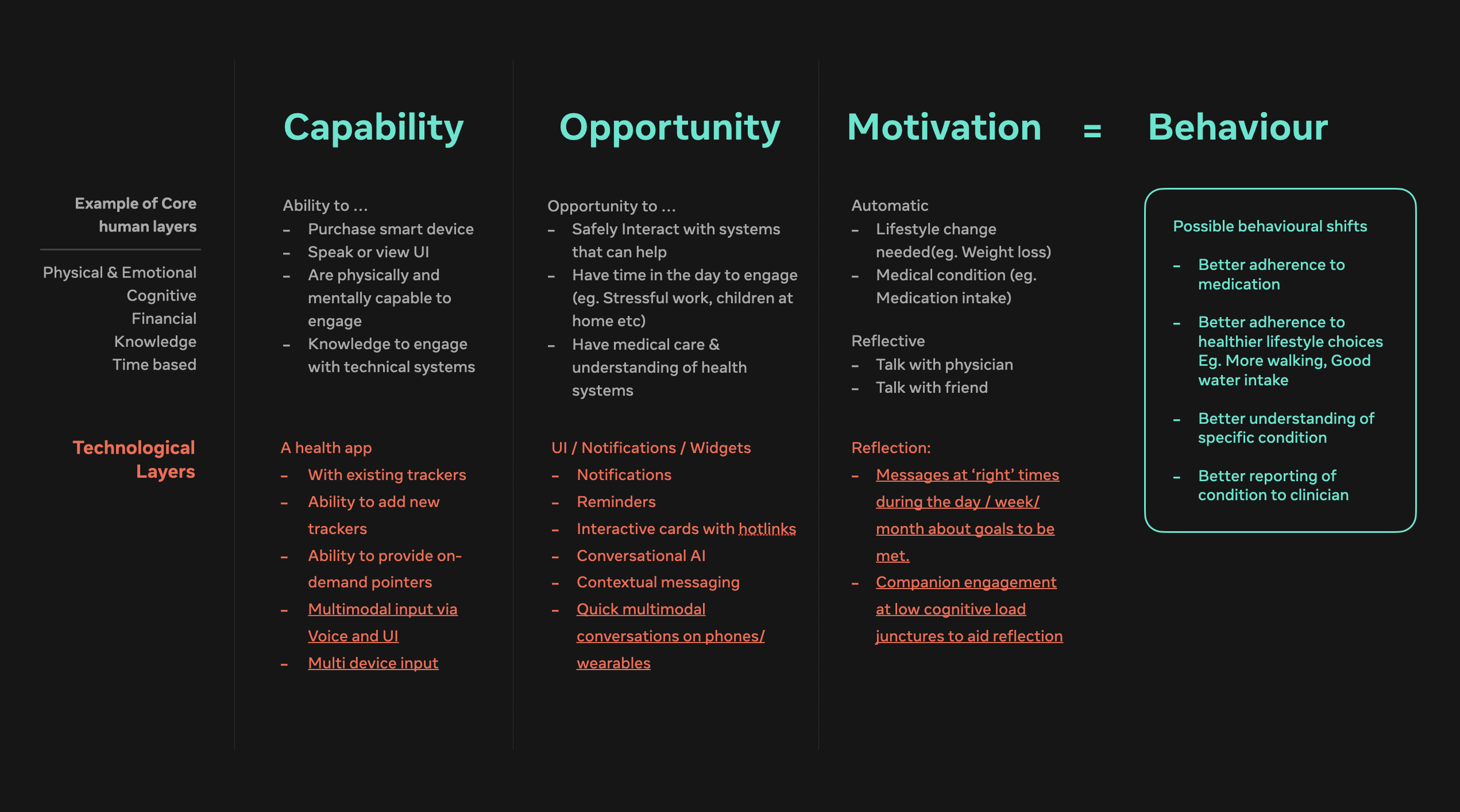
COM-B is a framework for understanding the levers that drive behaviour change. It identifies three: Capability, Opportunity, and Motivation. For my purposes, I've separated what an application can realistically influence from what sits beyond its reach — financial pressures, physical health, emotional state. My focus is on what technological intervention can actually move, as mapped below.
My humble mapping of HealthMate against this model pushed me beyond notifications and conversational prompts, toward three directions worth pursuing:
Deeper integration beyond the phone — wearables and ambient inputs that reduce the friction of conscious logging.
Richer, more adaptive conversations with Generative UI — the ability to modify or set reminders inline, tied to current or newly introduced tracking parameters.
Motivational messaging at moments of cognitive engagement — recognising when a person is most receptive, and using those windows to proactively offer motivation and guidance.
Before diving into each area, it's worth naming something that sits underneath all of the above: Building Trust. For example : Motivational coaching only works if a companion is genuinely acting in a user's interest, providing factual information with transparency, always keeping the human in control and by never assuming and being always open to listen. Building a cycle of trust is a hard one to get right, easy to lose and constantly on the back of my mind.
1. Leaning Into Wearables and Voice — Increasing capability and opportunity
The fastest way to increase logging opportunities, at least in my case, felt obvious: a wearable device. This led me to build two things for my Apple Watch — a companion app mirroring the core phone functionality, and Siri shortcut integration for quick parameter logging.
Getting there involved some real decisions. My initial instinct was to include quick-action UI elements alongside the chat interface — a hybrid of visual input and conversational. That ran into two problems: the form factor (small screen, legibility constraints) and the complexity of two-way data transfer between watch and phone. There was also a deeper UX issue: building a fixed visual UI meant making assumptions about what someone would want to see on their watch. That felt like the wrong call.
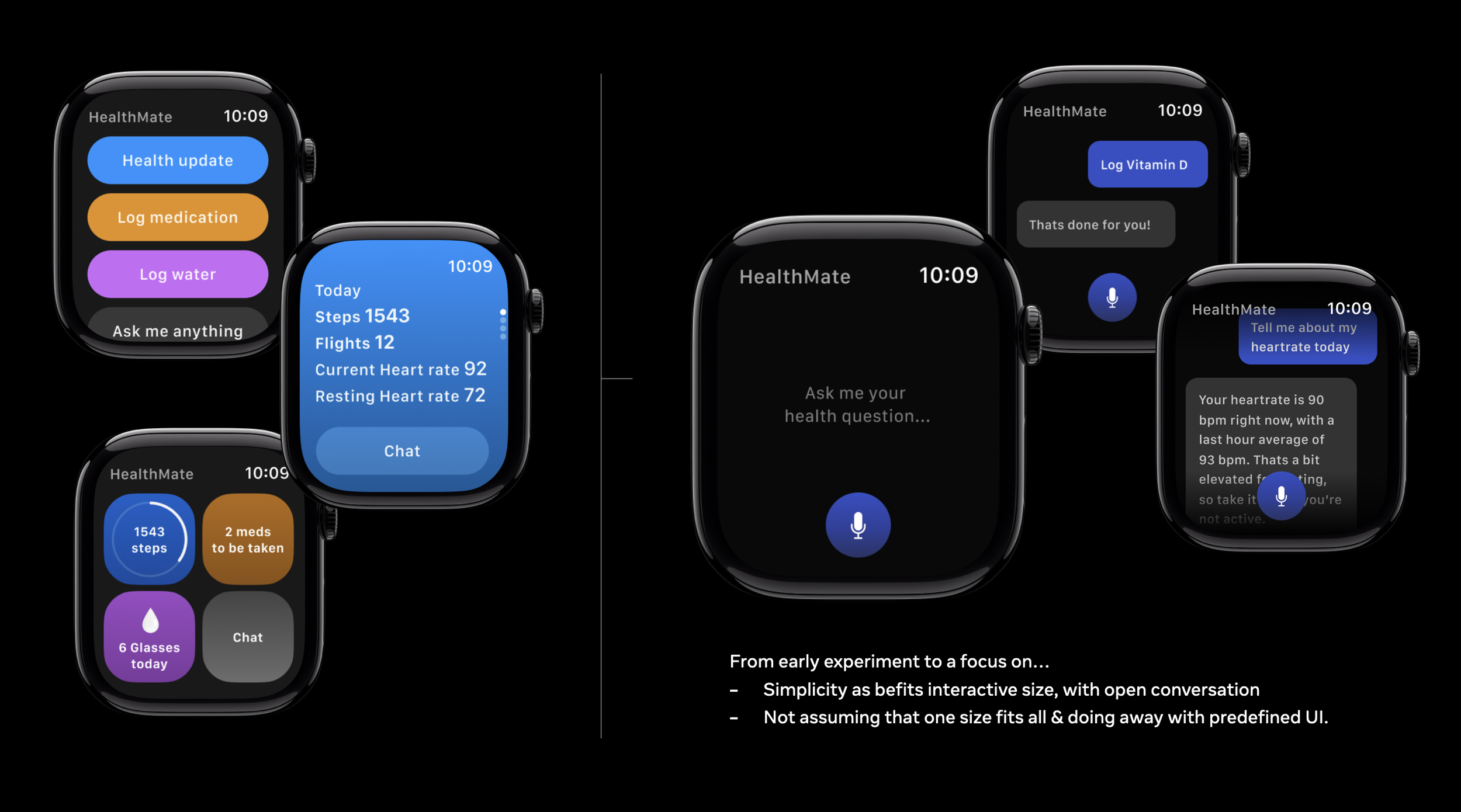
So I stripped it back. The watch interface is now focused almost entirely on conversation and voice input, leaving the interaction open-ended rather than prescriptive. After living with this for over a week, it has meaningfully increased the speed of both logging and quick queries.
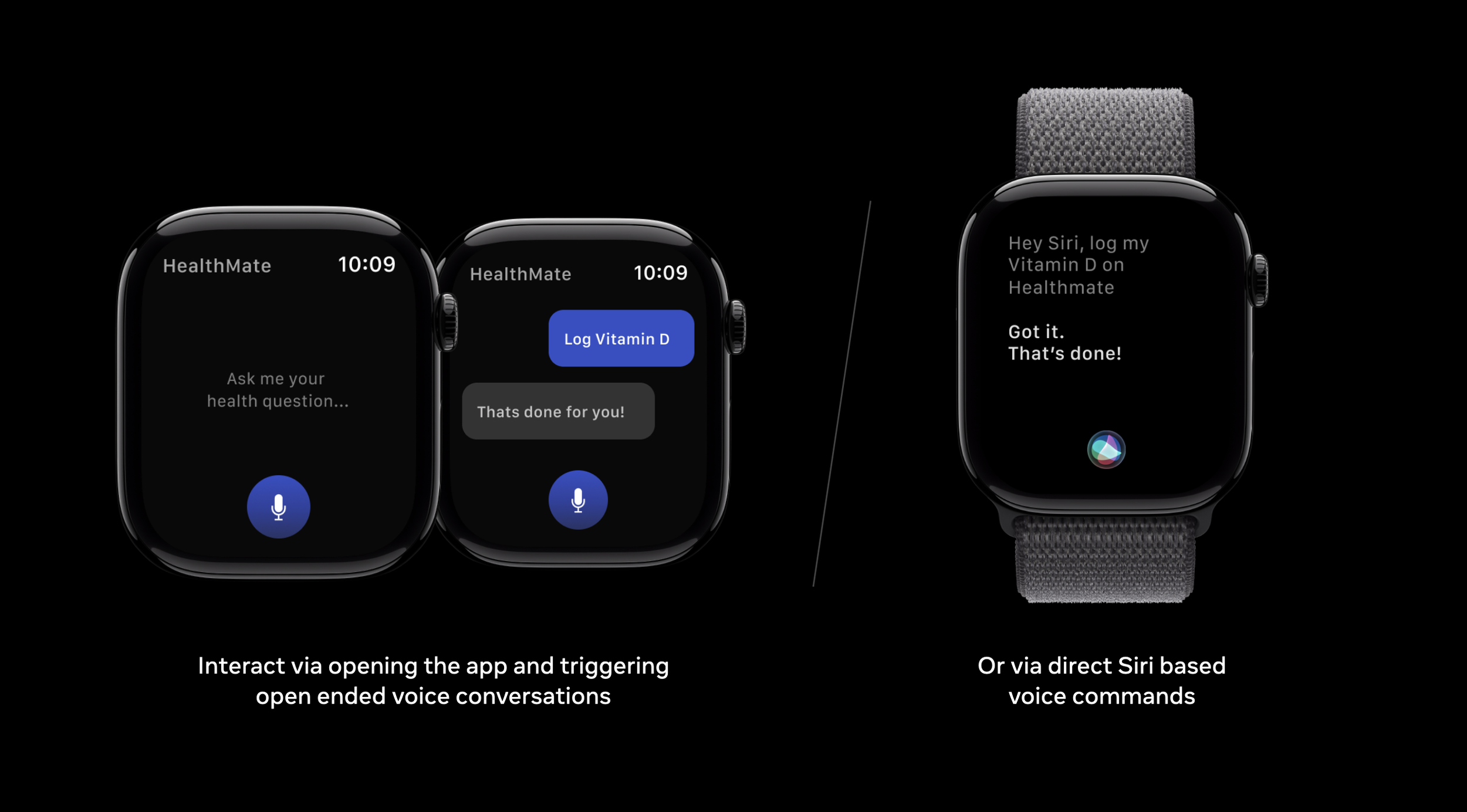
The Siri shortcuts have been particularly useful (while a bit buggy) — especially for medication logging, which has been my biggest adherence gap.
2. Richer Conversations With Adherence Built In — Increasing Opportunity
Generative UI for custom trackers is useful in principle, but I kept hitting two practical problems: the generated UI not being right & the logging itself. Water intake, for example, defaults to glasses — a unit that doesn't reflect how I actually drink through the day. And if I forget to set a reminder for a newly created tracker, adherence drops immediately.
So, this has been my thought process so far: extend the conversational companion so that when a new tracker is generated, the conversation naturally opens up options to modify parameters and add reminders inline — without requiring the user to navigate to a separate settings screen.
The very initial implementation is as seen below, but a lot more can be done in this regard.
3. Motivation at Key Moments — A Hypothesis Built Into the Prototype
This was the hardest part of the COM-B model to translate into trustworthy interaction. Motivation takes many forms — from upfront goal-setting (done well by apps like Prandi* which I have started using recently) to gamification (streaks, points, badges). My instinct was to explore what I'd call the attentive coach model: a companion that builds a relationship with the user through asking, listening, and reflecting back — with the goal of fostering genuine adherence rather than surface-level engagement.
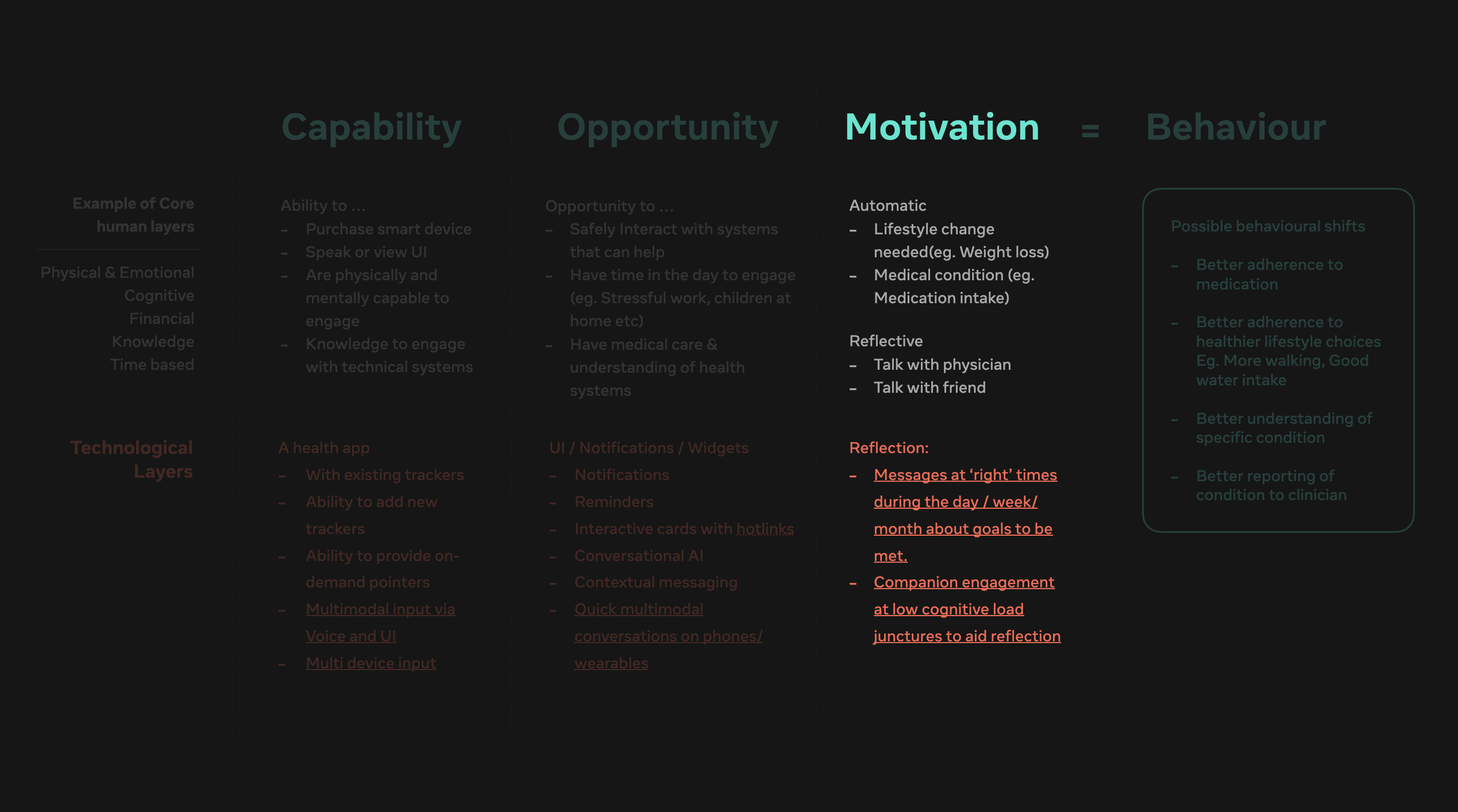
Focusing in on motivation
My implementation focused on reflective check-in messages sent at moments when the user has the cognitive headroom to actually engage — what I think of as coachable moments.
Finding those moments can be approached in different ways: programmatically, through manual user input, or through an initial working hypothesis that gets refined over time. The programmatic route is interesting — using step count, heart rate patterns, and location data over time to infer periods of relaxation where a check-in is likely to land well rather than get dismissed.
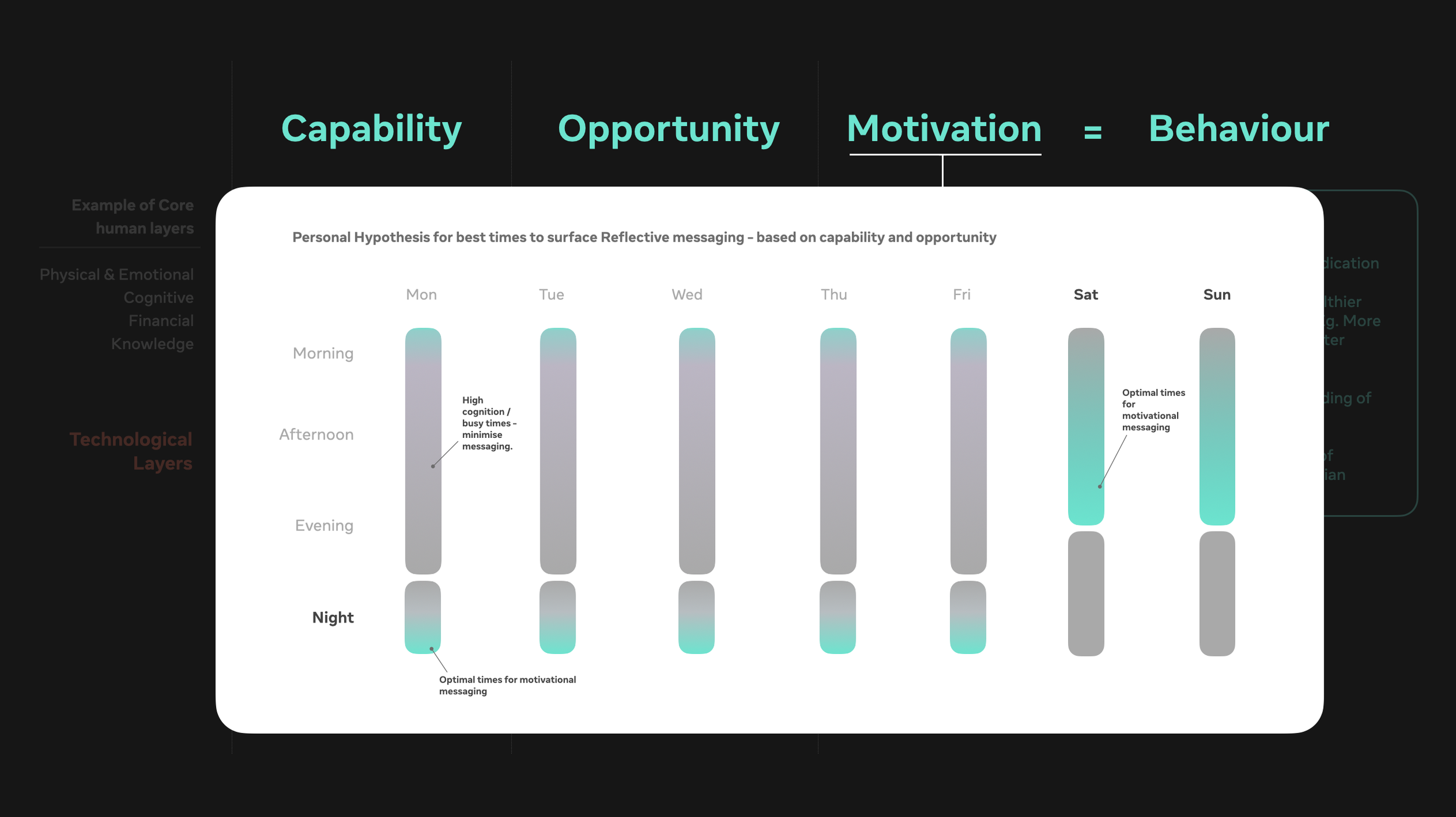
For now, I moved faster by using a personal approach: an evening check-in, delivered at an assumed time, that opens a threaded conversation aimed at motivating more consistent logging.
The thread has four parts:
Initial notification at the identified moment, deep-linking into the conversational interface.
A weekly recap with generative UI — stats, what went well, framed around encouragement rather than criticism.
Improvement pointers — if the user wants them, specific suggestions around adherence gaps (in my case, medication logging), delivered without assumption or condescension.
A timing check — asking whether the check-in time works, or whether the user would prefer to move it. It turns out Saturday morning works better for me than the weekday evening I started with.
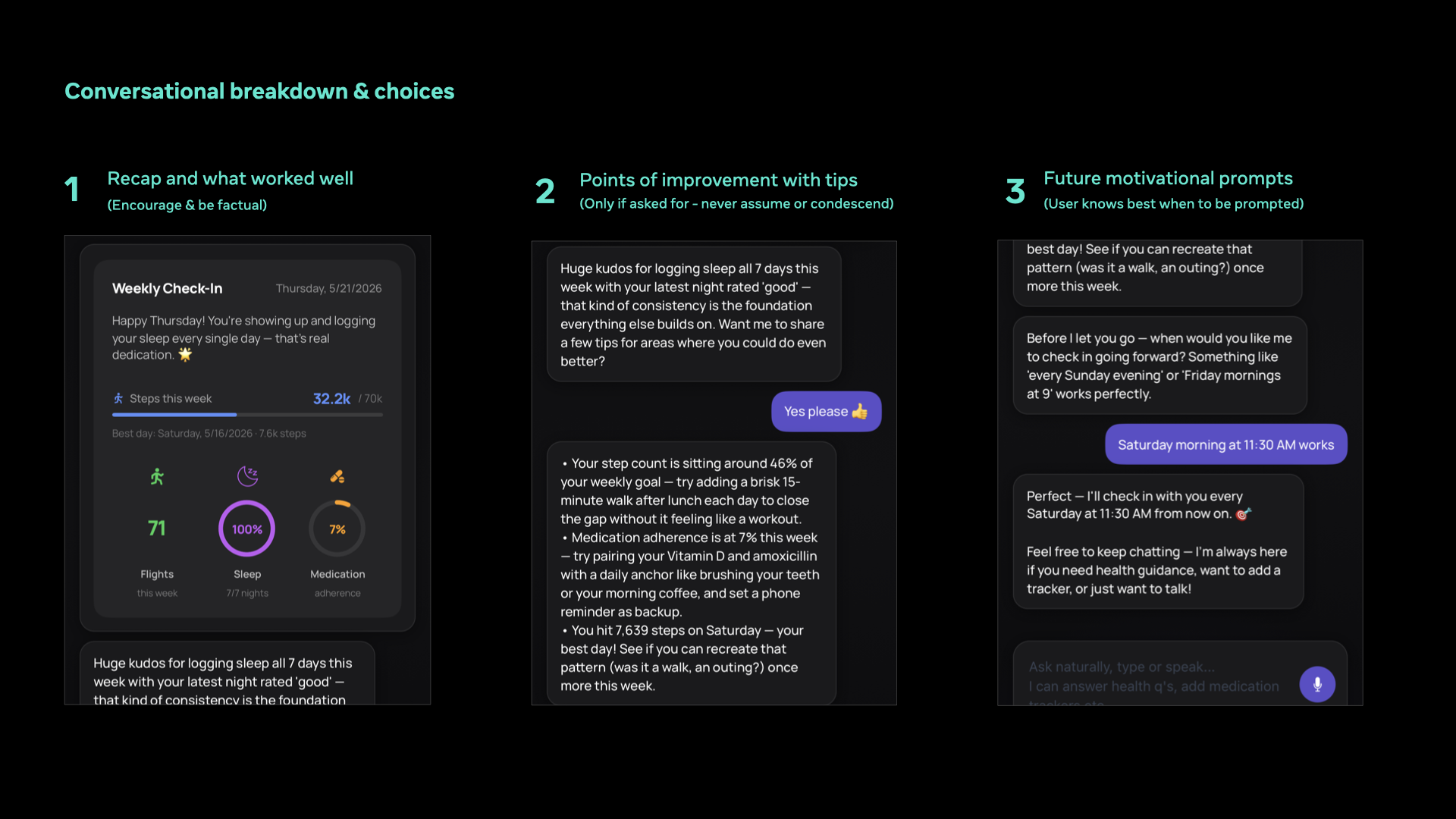
Breaking down parts of the conversation
This is a hypothesis, and I'll follow up in future posts about how it performs in practice & how trustworthy I find this exchange. An attentive coach model only works if the user comes to believe, over time, that the companion is genuinely paying attention: that it remembers what was said last week, that it doesn't repeat itself unhelpfully, that it knows when to push and when to leave well alone. As I mentioned before - it's hard to build this cycle of trust.
I am sure there are numerous aspects that could be changed about the tone, content, frequency and restraint as I learn more.
Some Asides Worth Mentioning
On building for Apple Watch. Vibe-building for watchOS surfaced some real constraints: frequent connection drops between Xcode and my device, the debugging overhead that came with that, and a noticeable energy usage spike when running the conversational interface. My codebase is almost certainly less efficient than a trained engineer's — but it was an eyeopener about the genuine technical constraints of ambient, always-on interfaces.
On prompting and chunking with Claude Code. As the prototype has grown, effective prompting has become genuinely important. The biggest learning: spec and chunk the build into discrete subfeatures early, to keep the conversational thread efficient and avoid context loss mid-build. My friend Adnan Khan has written an excellent primer on doing this well — worth reading if you're working the same way. LINK
New launches. I am excited to see new products like Google health coach launch worldwide in the last week or so. Curious how AI companions will drive adoption and adherence.
Coming in Part 3: Getting closer to contextually relevant Interfaces
There's more being built and more to share - especially into details around Gen UI, richer interrogation by providing the intelligence more context (visuals, audio etc), alongside building motivational coaching that I can trust over time.
But the part I most want to get to is still ahead: contextually relevant UI surfaced by the AI at the right moments in my day — not triggered by me, but inferred from patterns in my data over time. I'm hoping that the improvements in logging frequency from this round of features will give the model enough signal to start acting on.
The real acid test, though, will be deploying all of this to my father's devices. It was conversations with him that started this whole exploration. I'm looking forward — with some trepidation — to the feedback that follows.
More soon.
A shout out to Elana Jeeaooo - who recently launched Prandi app for understanding the nutritional qualities of the food you eat (aimed towards health goals), with photographs scanned by AI. It's pretty damn good - do try it out!
Rethinking Health Apps & Tracking with Embedded intelligence — P1
“An interface is humane if it is responsive to human needs and considerate of human frailties”
This post is also on my Linkedin account - dated 17th May, 2026 : LINK
The Burden of Feature Bloat in Health Apps
For years, apps like Apple Health and Google Health have served as central repositories for our wellness data. Powerful and genuinely useful — but their vastness comes at a cost: complexity and cognitive overload.
My father is a physician with forty years of experience. He is no stranger to complex software. Yet he finds mobile health apps consistently frustrating — confusing information hierarchies, feature creep, controls that are hard to find and harder to modify. Whether setting up a blood pressure tracker or logging medication intake, simple tasks feel buried, and the interface offers little room to adapt. He is not alone in this, there’s a bunch of views out there linklinklink
Facing the same frustrations as an everyday user, I decided to catalogue the problems and start acting on them. Over the past several weekends I have been building fully-fledged iOS & Android app prototypes to live with (using AI prototyping tools of course)— exploring how AI-enabled interfaces can reduce this cognitive burden and make health tracking genuinely easier to use.
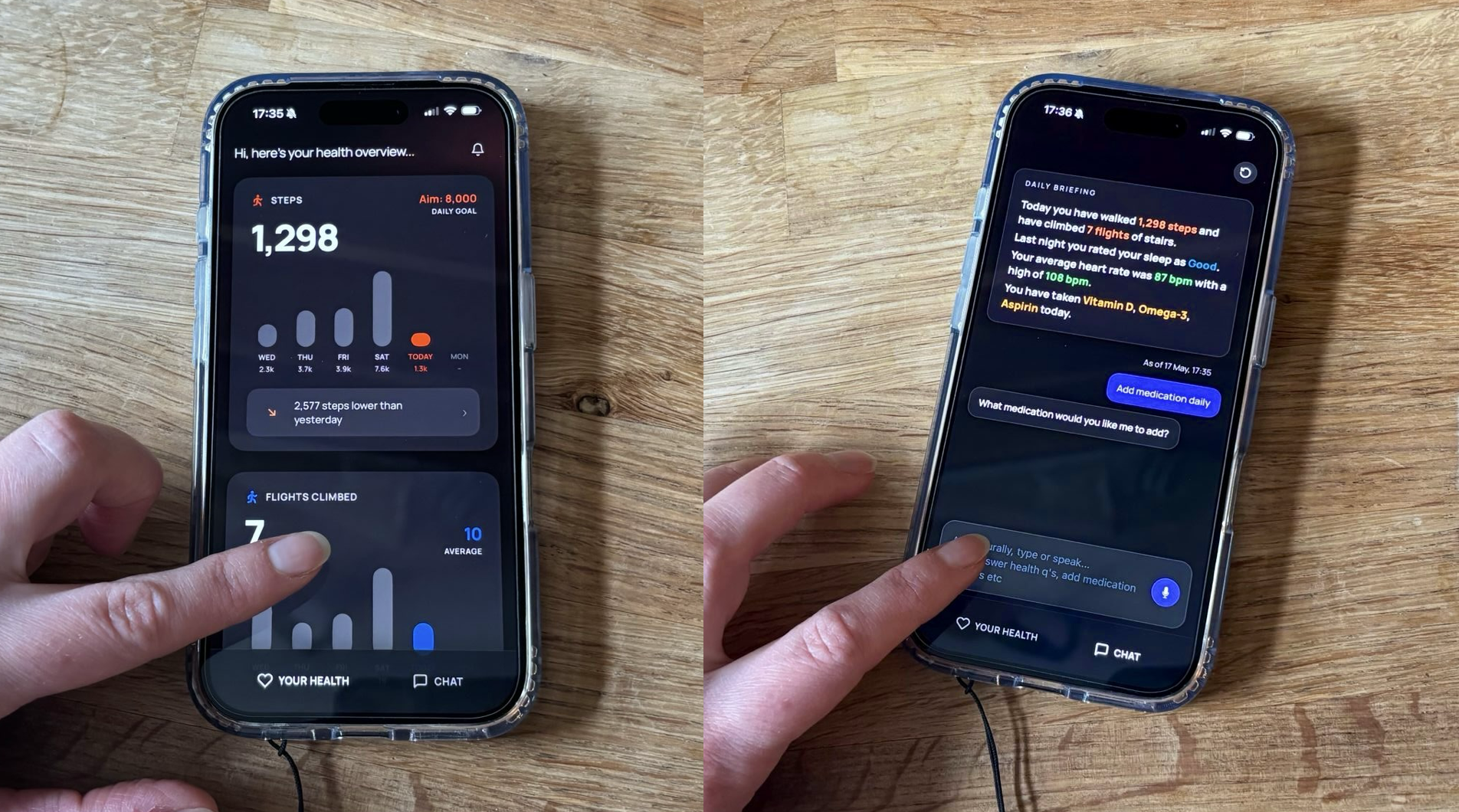
The current prototype I am living with…
Why: The Human Problems Worth Solving
What follows is informal research — drawn from reading, personal experience, and conversations with both serious and casual trackers. Essentially: what my father and I would actually want from a health app.
Speed of interaction and IA complexity. "Where do I find my heart rate trends? How do I add a new medication?" Every new feature adds architectural complexity. Simple tasks get buried. Discoverability suffers.
Inability to see data relationships. "What's the relationship between my steps and my sleep?" Charting data over time exists, but drawing meaningful correlations across different parameters remains largely absent.
Lack of customisability. "I want to track my fibre intake by taking photos of food — can I just add that?" Everyone's circumstances are different. Health apps should reflect that.
Lack of contextual empathy and proactivity. "What I need to see changes constantly — can the app react to me?" What a person needs to track shifts by the day, through the day, and with how they are feeling. Most apps are reactive at best.
Notification and reminder setup. "Apple Health has great reminders, but setting them up takes real effort." Reminders should be configurable on the fly, without requiring deep knowledge of the interface.
Quick advice and support. "I already use ChatGPT for health questions — can that just live inside my health app?" Conversational AI is the obvious next step here, though it opens genuine questions around trustworthiness and sourcing — something I am still working through.
Two I am not tackling yet: connecting to personal health records, and enabling communication with doctors or care providers. Both require careful thinking about privacy, data permissions, and integration with health services — not something to prototype casually.
Diving Deeper: HealthMate and the AI-Embedded Approach
This gave me enough to work with. The result is a prototypical iOS/Android app I am calling HealthMate — arrived at through multiple iterations using Claude Code, Cursor, and Stitch. This is essentially a wrapper around Apple health or Google health, with the focus not on visual polish. It is behavioural UX: building something to live with, observe, and learn from over time.
The core problem is that current health apps offer a static, one-size-fits-all interface — over-reliant on feature density and fixed information architecture. The alternative I am testing combines three things: conversational UI, generative UI, and contextual awareness — used to augment an existing dashboard rather than replace it entirely. A helpful companion to reason with, alongside a structure that can flex to match what a person actually needs in a given moment.
This is not a cosmetic improvement. A static dashboard assumes the designer knows what you need. A generative, contextually aware one stays pliable — responding to both manual input and automatic inference about what matters right now.
Part One: What I am living with and logging everyday
Pillar 1 — Conversational Companion
A persistent conversational layer sits alongside the existing dashboard, enabling:
Natural language enabling faster access to actions that previously required navigating multiple UI layers — for example, adjusting a daily steps goal based on recent behaviour.
On-the-fly data interrogation — asking for a heart rate map across the day, without digging through charts.
Quick logging without UI interaction — voice input via Siri to mark medication as taken, a capability that did not exist before / harder to set up.
Open-ended health queries — eg. asking what to do about a neck ache, getting a considered response in context, whereas asking about a headache gets a different response.
Pillar 2 — Generative UI via the Conversational Companion
The conversational layer does not just answer questions — it reshapes the interface in response to them:
Explore relationships: Natural language prompts generate on-the-fly visualisations — for example, overlaying steps and heart rate data to reveal patterns
Focus mode: Ask to focus on steps, heart rate, and sleep — and everything else collapses away
New trackers on demand: Introducing a new goal — migraine tracking, water intake — dynamically generates the relevant input fields and widgets, without navigating settings
Reminders on the fly: Set or modify notifications through conversation, without needing to understand the notification settings hierarchy
A couple of asides
Letting Go of Rule-Based Design
One of the more interesting challenges of working this way is the need to let go of rule-based design — the instinct to define precisely how an interface can and cannot be used. Working with generative and conversational UI means setting guidelines and heuristics that both the AI and the user can operate within fluidly, rather than enforcing rigid interaction patterns. It is a different kind of design rigour, not an absence of it.
Hallucinations and bug fixing
Another battle has been with bug fixing and dealing with hallucinatory replies. I have tried to keep away from this rabbit hole and fix what I can given that this is a prototype, but have been fixing things on the fly which result in better quality interactions.
Part 2 — Coming Up in the Next Iteration
Contextual empathy: when the UI gets out of the way of behaviour
The next stage — once I have lived with the current prototype long enough to draw conclusions — is to move toward fully context-driven UI generation. Rather than a dashboard of twenty metrics, the AI assesses the current situation and surfaces only what matters most right now. This is not far away, there are services and apps offering capabilities that are close, resembling coaches: Onva, Bevel
The same underlying data, but possibly radically different interfaces — because the need is different.
But this surfaces the harder design problem. If your heart rate is elevated and you have not logged lunch and you are behind on steps — what gets surfaced? The prioritisation logic that answers that question — balancing urgency, goal proximity, anomaly severity, and user history — is where the real design work lives.
The End Goal: Simplicity, with the Human Always in the Loop
This brings me to questions I keep returning to: How much of this prioritisation should the AI own, and how much should remain in the user's control? How much will a person trust, when an AI companion provides a recommendation? How do we build a fruitful relationship?
An AI that helps you interrogate patterns and understand your health better makes clear sense. But one that silently decides what you need — however accurately — risks creating a new kind of opacity: users losing legibility over their own health picture. The goal is not to replace your judgment or overtake cognitive abilities. It is to reduce the effort required to exercise it, by using AI to understand patterns, build memory trails & a legible health history.
I hope to understand this better over the next few months of living with the prototype.
Findings from my lab - a message from the past
One always finds gems in an old waistcoat when you least expect it and are not looking for anything in particular. Here are a set of old explorations pre-ustwo (before 2014)

...& other tales of wonder
Playful experiments with the Physical and Digital.
From face detection, projection mapping, fiducial markers to video explorations into interesting interactions. 
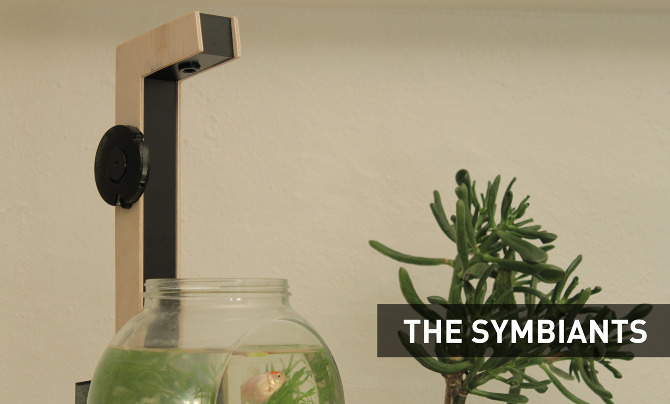
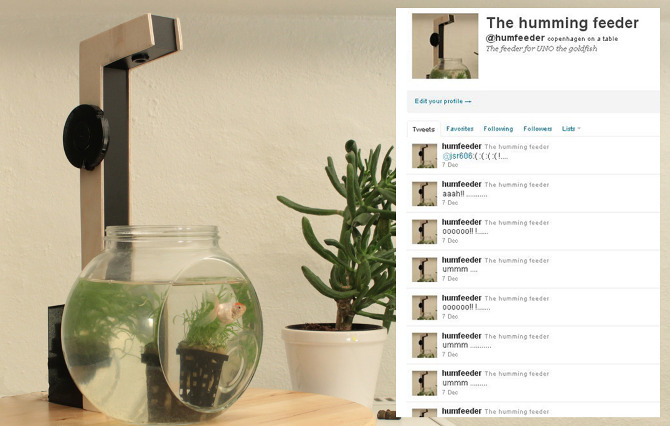
'Symbiants'
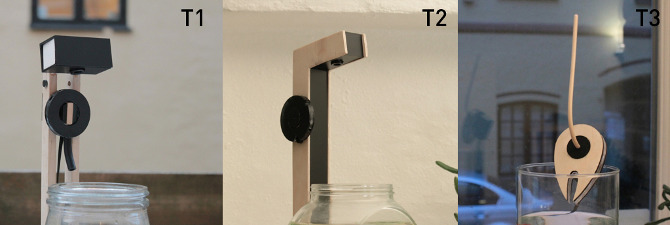
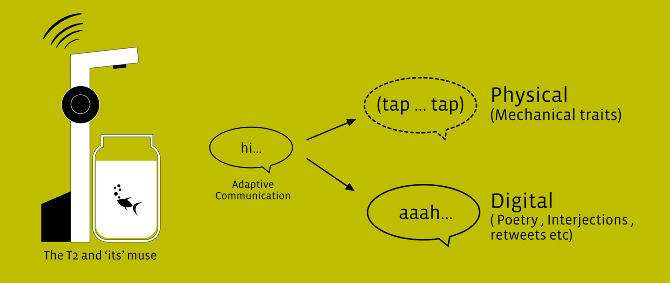
Agency/behavior in software objects
My thesis project at CIID. This is a speculative project which began with behavioral experiments to explore possible 'Mutualistic' relationships between networked electronic objects with agency and Human beings. It then progressed to a fictional narrative / commentary on the possibilities in the near foreseeable future.